
A business location should be listed only once on Yelp. If a business has multiple locations, each individual location should be listed separately (although there may be exceptions - for example, a food truck that appears in different parts of town on different days can have a single business page). If you notice that there are multiple pages on Yelp for the same business location, you can let us know by submitting a report.
Instructions for:
Yelpers & Business Owners
From the website (www.yelp.com)
1. Find the business page
2. Click the Edit link:

3. Check the This is a duplicate of another business on Yelp box at the bottom
4. Provide your email if you’re not logged in to a user account
5. Provide a link to the duplicate business page(s) and any further information
6. Click Submit Changes
(Top of Page)
2. Click the Edit link:
3. Check the This is a duplicate of another business on Yelp box at the bottom
4. Provide your email if you’re not logged in to a user account
5. Provide a link to the duplicate business page(s) and any further information
6. Click Submit Changes
(Top of Page)
From an iPhone
1. Find the business page
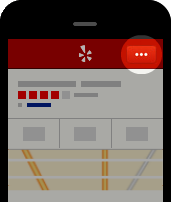
2. Tap the More Options icon:
3. Tap Edit Business
4. In the Notes field, let our moderators know that the page is a duplicate
5. Tap Done
6. Tap Submit
2. Tap the More Options icon:
3. Tap Edit Business
4. In the Notes field, let our moderators know that the page is a duplicate
5. Tap Done
6. Tap Submit
From an Android
1. Find the business page
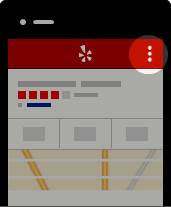
2. Tap the Overflow Menu:
3. Tap Edit Business
4. In the Notes field, let our moderators know that the page is a duplicate
5. Tap Done
6. Tap Submit
(Top of Page)
2. Tap the Overflow Menu:
3. Tap Edit Business
4. In the Notes field, let our moderators know that the page is a duplicate
5. Tap Done
6. Tap Submit
(Top of Page)